My Tickets Aren't Attached To My Receipt
If your order is larger than 10 tickets, you won't receive an attached PDF on your order receipt email, Instead,
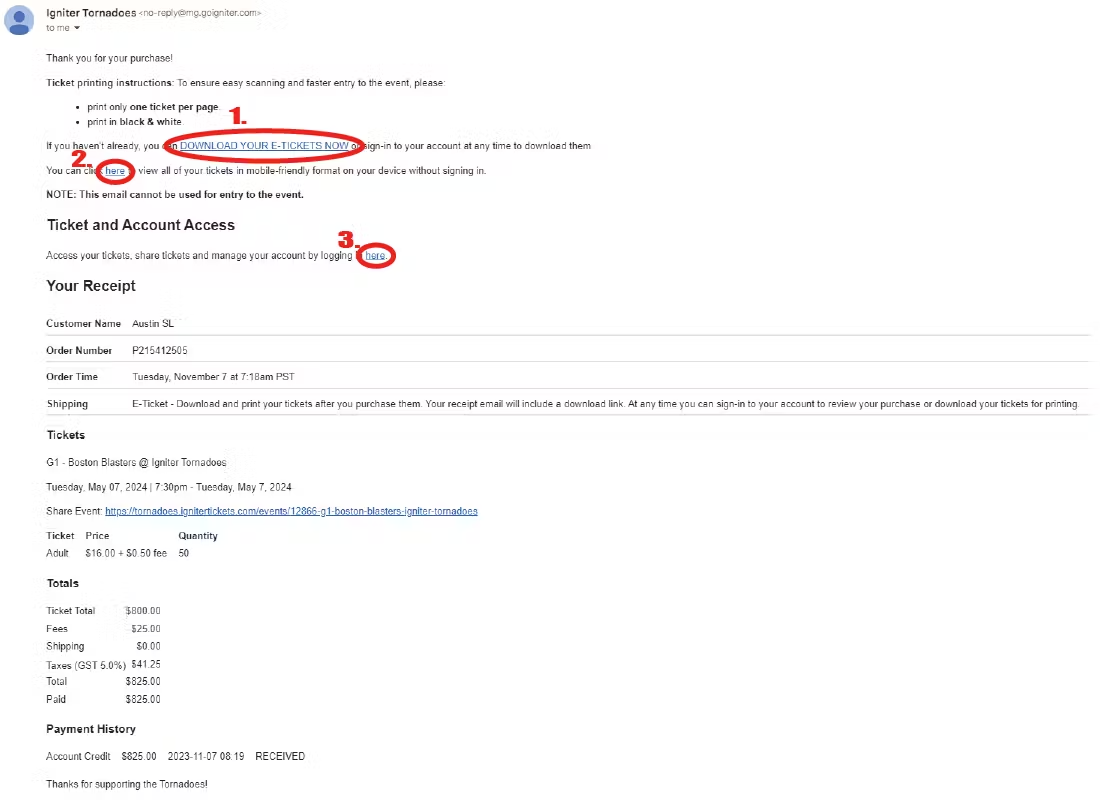
For large or bulk orders, where it is not feasible to attach large PDF files to the receipt, You will instead see
1. Direct PDF Download Link, No Login Required. You can use this option to access the tickets directly from your browser without logging in to access.
2. Direct Mobile Wallet Link, No Login Required. This is a web, mobile-friendly option to view all barcodes for all tickets in your order without signing in.
3. Account Log-in Link. You can still sign-in to your account to manage your tickets and share tickets to others.
Related Articles
Accessing your Tickets from the Receipt
The Receipt page has several options for accessing tickets. Use the Manage and Share link to access Season Tickets or single game tickets from Ticket Packages. Single Event orders contain tickets for specific events only. Package orders contain the ...How can I download my tickets?
Option 1: From your receipt Tickets are attached to your emailed receipt in PDF and WalletPass formats. Option 2: From your account 1) In the top menu, select "My account" 2) Use the email address you used when placing the order. You can recover your ...How To Share Tickets and Receive Shared Tickets
You can share your tickets by logging into your account, and going to the "Tickets" page for your order, and opening the "Share Tickets" link above the download column of the tickets table. Once here, you can select the tickets you want to share, and ...I have lost or misplaced my tickets!
At any time you may re-download or re-print your tickets from your account. Here is how.My tickets have someone else's name on them.
If your tickets have a printed name on them, the name printed will be the same as the purchaser's. Tickets do not have to be in your name to use them.