How to Use Vouchers
Vouchers can be managed and redeemed from your account.
Access vouchers from My Orders or a receipt.
After selecting 'Vouchers'
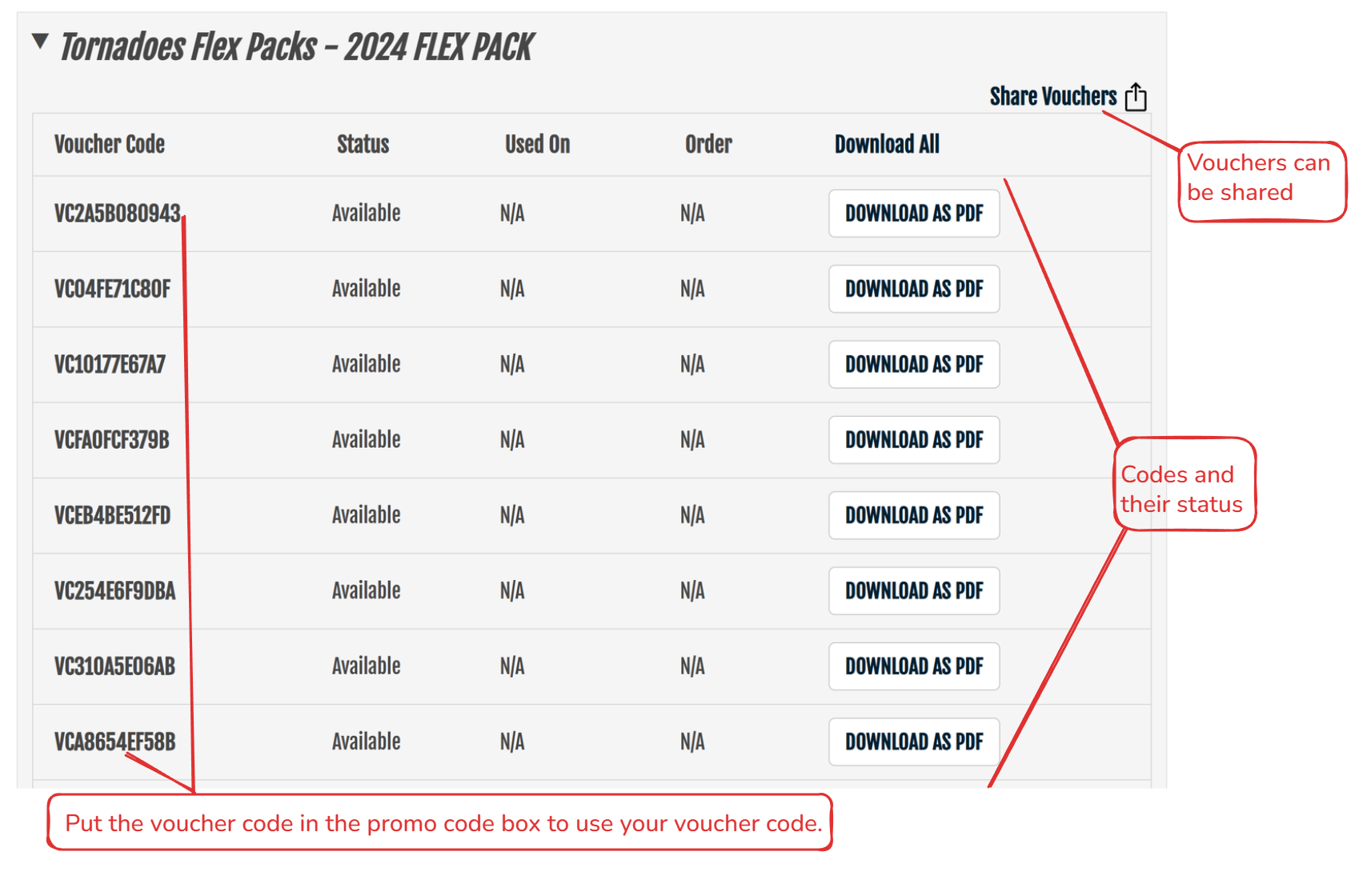
How to use Vouchers when purchasing tickets
It will show below which vouchers have been applied.
You can then select 'Find Tickets', choose you seat and your voucher will show as applied.
Related Articles
How to use Turnbacks
Turnbacks (when enabled*) allow you to return tickets you cannot use or share. Choose the tickets you wish to return. Igniter will maintain a history of tickets you have returned.Season Ticket Management
You can use your OneTicket Passes or Single Event tickets for the same event but not both.Exchanges or Refunds
Our Technical Support team cannot assist with this request. Please see the purchase and refund policy. If necessary, inquire with the box office directly, or use the Contact Us page to inquire with the box office.My tickets have someone else's name on them.
If your tickets have a printed name on them, the name printed will be the same as the purchaser's. Tickets do not have to be in your name to use them.How to Access your Account
On your favorite team's ticket portal, select 'My Account' Use the Forgot Password link and enter your email address. You will receive an email with instructions on how to reset your password. Be sure to check your junk or spam folders if you do not ...